
Thesignature Font
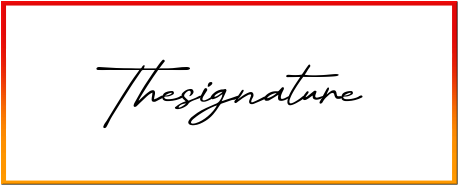
#Manuscrito #Khurasan #the signature
Thesignature Font Preview
Free ZIP · 1 font file · Free for Personal Use
Thesignature
Thesignature Character Map
Uppercase
ABCDEFGHIJKLMNOPQRSTUVWXYZ
Lowercase
abcdefghijklmnopqrstuvwxyz
Numbers
0123456789
Punctuation
!"#$%&'()*+,-./:;<=>?@[\]^_`{|}~
Other characters
¢£¤¥±×÷‘’“”€
Is Thesignature free for commercial use?
Free for Personal Use No. Thesignature is free for personal use. The font file does not give permission for commercial use, so for logos, products or client work, get a commercial license from the designer first. Visit the designer
Thesignature is a handwritten font created by Khurasan. The letters have the small wobbles and personality of real handwriting, so your text feels warm instead of printed. You can download it for free and test it with your own words in the preview above.
Thesignature Font Details
- Designer: Khurasan
- Category: Handwritten font
- Font styles: 1 (Regular)
- Glyphs: 110
- Characters: A–Z, a–z, 0–9 and basic punctuation
- Languages: English
- Version: 1.000
- Download: Free ZIP with one font file
What You Can Type With Thesignature
With complete upper and lowercase letters and all ten digits, Thesignature is ready for real wording, not just a single headline. Everyday marks like &, !, ? and @ are there too. There are no accented letters like é or ñ, so it's best kept to English text.
Where Thesignature Works Best
Thesignature is a natural fit for greeting cards, journal pages and friendly social posts. Set it a bit larger than you would a normal text font. Handwriting styles lose their charm once they get too small to read comfortably.
Thesignature Font FAQs
Is Thesignature font free to download?
Yes, Thesignature is a free download here: one ZIP file with one font file, no sign-up needed. For commercial projects, read the license note on this page first, since that's set by the designer.
How do I install Thesignature on Windows or Mac?
Unzip the download first. On Windows, right-click the .ttf or .otf file and choose Install. On a Mac, double-click the file and click Install Font. Then close and reopen your design app, and Thesignature will appear in the font list.
Can I use Thesignature in Canva?
Yes, if you have Canva Pro, Teams or another plan that allows font uploads. Go to Brand Kit, choose Upload a font, and pick the .ttf or .otf file from the ZIP. Free Canva accounts can't upload fonts.
Does Thesignature work in Word, Photoshop and Cricut Design Space?
Yes. Once Thesignature is installed on your computer, it shows up in Word, Photoshop, Illustrator, Cricut Design Space and most other desktop apps, right alongside your other fonts. If you don't see it, restart the app.
Does Thesignature support accented letters?
No. Thesignature has no accented letters such as é, ñ or ü, so it's best for English text.
What fonts pair well with Thesignature?
A plain sans serif like Open Sans or Poppins makes a good partner for any longer text around it.