
Single Day Font
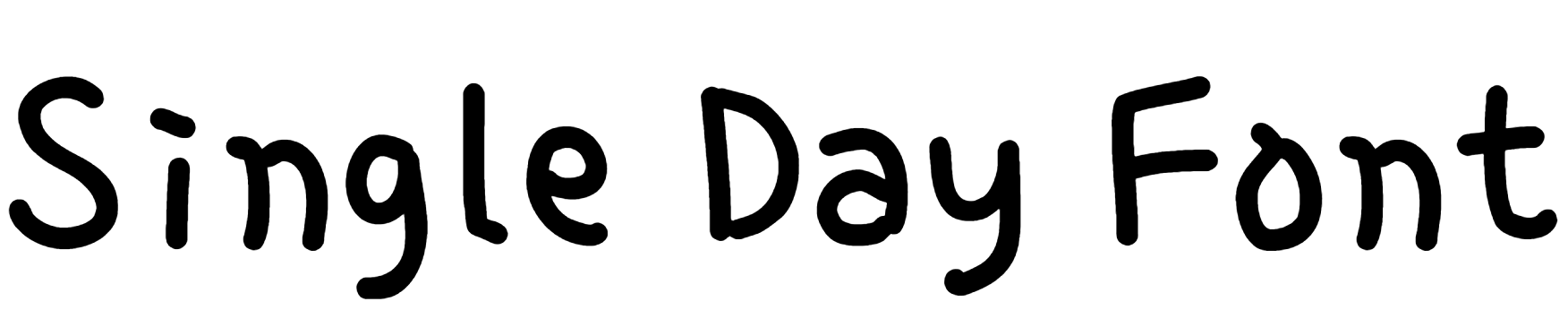
Single Day Font Preview
Free ZIP · 1 font file · Free for Commercial Use
Single Day
Single Day Character Map
Uppercase
ABCDEFGHIJKLMNOPQRSTUVWXYZ
Lowercase
abcdefghijklmnopqrstuvwxyz
Numbers
0123456789
Punctuation
!"#$%&'()*+,-./:;<=>?@[\]^_`{|}~
Other characters
‖‘’“”…₩ㄱㄲㄳㄴㄵㄶㄷㄸㄹㄺㄻㄼㄽㄾㄿㅀㅁㅂㅃㅄㅅㅆㅇㅈㅉㅊㅋㅌㅍㅎㅏㅐㅑㅒㅓㅔㅕㅖㅗㅘㅙㅚㅛㅜㅝㅞㅟㅠㅡㅢㅣㅥㅦㅧㅨㅩㅪㅫㅬㅭㅮㅯㅰㅱㅲㅳㅴㅵㅶㅷㅸㅹㅺㅻㅼㅽㅾㅿㆀㆁㆂㆃㆄㆅㆆㆇㆈㆉㆊㆋㆌㆍㆎ가각갂갃간갅갆갇갈갉갊갋갌갍갎갏감갑값갓갔강갖갗갘같갚갛개객갞갟갠갡갢갣갤갥갦갧갨갩갪갫갬갭갮갯갰갱갲갳갴갵갶갷갸갹갺갻갼갽갾갿걀걁걂걃걄걅걆걇걈걉걊걋걌걍걎걏걐걑걒걓걔걕걖걗걘걙걚걛걜걝걞걟걠걡걢걣걤걥걦걧걨걩걪걫걬걭걮걯거걱걲걳건걵걶걷걸걹걺걻걼걽걾걿검겁겂것겄겅겆겇겈겉겊겋게겍겎겏겐겑겒겓겔겕겖겗겘겙겚겛겜겝겞겟겠겡겢겣겤겥겦겧겨격겪겫견겭겮겯결겱겲겳겴겵겶겷겸겹겺겻겼경겾겿곀곁곂곃계곅곆곇곈곉곊곋곌곍
Is Single Day free for commercial use?
Free for Commercial Use Yes. Single Day is free for both personal and commercial use, such as logos, products and client work. Check the license file in the download for any conditions, such as crediting the designer. Read the license
Single Day is a handwritten font created by DXKorea. It looks like someone actually wrote it by hand: relaxed, friendly and a little imperfect in a good way. It's a free download, and you can try it with your own text in the preview above first.
Single Day Font Details
- Designer: DXKorea
- Category: Handwritten font
- Font styles: 1 (Regular)
- Glyphs: 12,127
- Characters: A–Z, a–z, 0–9 and basic punctuation
- Languages: English
- Version: 1.00
- Download: Free ZIP with one font file
What You Can Type With Single Day
With complete upper and lowercase letters and all ten digits, Single Day is ready for real wording, not just a single headline. Common punctuation such as &, !, ? and @ is included as well. It doesn't include accented letters such as é or ñ, which makes it an English-only font.
Where Single Day Works Best
Single Day is a natural fit for greeting cards, journal pages and friendly social posts. Set it a bit larger than you would a normal text font. Handwriting styles lose their charm once they get too small to read comfortably.
Single Day Font FAQs
Is Single Day font free to download?
Yes, Single Day is a free download here: one ZIP file with one font file, no sign-up needed. For commercial projects, read the license note on this page first, since that's set by the designer.
How do I install Single Day on Windows or Mac?
Unzip the download first. On Windows, right-click the .ttf or .otf file and choose Install. On a Mac, double-click the file and click Install Font. Then close and reopen your design app, and Single Day will appear in the font list.
Can I use Single Day in Canva?
Yes, if you have Canva Pro, Teams or another plan that allows font uploads. Go to Brand Kit, choose Upload a font, and pick the .ttf or .otf file from the ZIP. Free Canva accounts can't upload fonts.
Does Single Day work in Word, Photoshop and Cricut Design Space?
Yes. Once Single Day is installed on your computer, it shows up in Word, Photoshop, Illustrator, Cricut Design Space and most other desktop apps, right alongside your other fonts. If you don't see it, restart the app.
Does Single Day support accented letters?
No. Single Day has no accented letters such as é, ñ or ü, so it's best for English text.
What fonts pair well with Single Day?
A plain sans serif like Open Sans or Poppins makes a good partner for any longer text around it.