
Gaegu Font
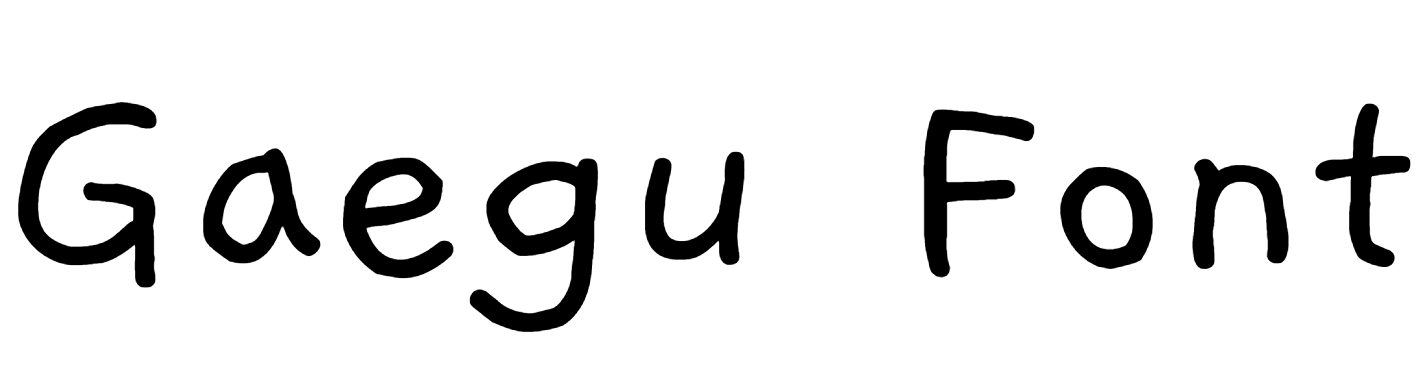
Gaegu Font Preview
Free ZIP · 3 font files · Free for Commercial Use
Gaegu
All 3 styles in this font
Gaegu Character Map
Uppercase
ABCDEFGHIJKLMNOPQRSTUVWXYZ
Lowercase
abcdefghijklmnopqrstuvwxyz
Numbers
0123456789
Punctuation
!"#$%&'()*+,-./:;<=>?@[\]^_{|}~
Other characters
‘’“”₩ㄱㄲㄳㄴㄵㄶㄷㄸㄹㄺㄻㄼㄽㄾㄿㅀㅁㅂㅃㅄㅅㅆㅇㅈㅉㅊㅋㅌㅍㅎㅏㅐㅑㅒㅓㅔㅕㅖㅗㅘㅙㅚㅛㅜㅝㅞㅟㅠㅡㅢㅣ가각간갇갈갉갊감갑값갓갔강갖갗같갚갛개객갠갤갬갭갯갰갱갸갹갼걀걋걍걔걘걜거걱건걷걸걺검겁것겄겅겆겉겊겋게겐겔겜겝겟겠겡겨격겪견겯결겸겹겻겼경곁계곈곌곕곗고곡곤곧골곪곬곯곰곱곳공곶과곽관괄괆괌괍괏광괘괜괠괩괬괭괴괵괸괼굄굅굇굉교굔굘굡굣구국군굳굴굵굶굻굼굽굿궁궂궈궉권궐궜궝궤궷귀귁귄귈귐귑귓규균귤그극근귿글긁금급긋긍긔기긱긴긷길긺김깁깃깅깆깊까깍깎깐깔깖깜깝깟깠깡깥깨깩깬깰깸깹깻깼깽꺄꺅꺌꺼꺽꺾껀껄껌껍껏껐껑께껙껜껨껫껭껴껸껼꼇꼈꼍꼐꼬꼭꼰꼲꼴꼼꼽꼿꽁꽂꽃꽈꽉꽐꽜꽝꽤꽥꽹꾀꾄꾈꾐꾑꾕꾜꾸꾹꾼꿀꿇꿈꿉
Is Gaegu free for commercial use?
Free for Commercial Use Yes. Gaegu is free for both personal and commercial use, such as logos, products and client work. Check the license file in the download for any conditions, such as crediting the designer. Read the license
Gaegu is an old school font made by JIKJI. Its letters look like they came off an old sign or a vintage product label. The free download includes three styles, and you can try every one of them with your own text in the preview above.
Gaegu Font Details
- Designer: JIKJI
- Category: Old school font
- Font styles: 3 (Regular, Light and Bold)
- Glyphs: 2,594 in the Regular style
- Characters: A–Z, a–z, 0–9 and basic punctuation
- Languages: English
- Version: 1.00
- Download: Free ZIP with three font files
What You Can Type With Gaegu
You get every letter from A to Z in both cases and all the numbers from 0 to 9, which means Gaegu can handle full sentences, dates and prices. Common punctuation such as &, !, ? and @ is included as well. It doesn't include accented letters such as é or ñ, which makes it an English-only font.
Where Gaegu Works Best
Think of Gaegu for vintage signs, barber shop logos and retro labels. Put it on an off-white or kraft-paper background and it instantly looks older. Because the family has more than one style, you can mix them in a single design for headings, subheadings and highlights.
Gaegu Font FAQs
Is Gaegu font free to download?
Yes, Gaegu is a free download here: one ZIP file with three font files, no sign-up needed. For commercial projects, read the license note on this page first, since that's set by the designer.
How do I install Gaegu on Windows or Mac?
Unzip the download first. On Windows, right-click the .ttf or .otf file and choose Install. On a Mac, double-click the file and click Install Font. Then close and reopen your design app, and Gaegu will appear in the font list.
Can I use Gaegu in Canva?
Yes, if you have Canva Pro, Teams or another plan that allows font uploads. Go to Brand Kit, choose Upload a font, and pick the .ttf or .otf file from the ZIP. Free Canva accounts can't upload fonts.
Does Gaegu work in Word, Photoshop and Cricut Design Space?
Yes. Once Gaegu is installed on your computer, it shows up in Word, Photoshop, Illustrator, Cricut Design Space and most other desktop apps, right alongside your other fonts. If you don't see it, restart the app.
Does Gaegu support accented letters?
No. Gaegu has no accented letters such as é, ñ or ü, so it's best for English text.
What fonts pair well with Gaegu?
It pairs nicely with a classic serif or a condensed sans serif for the supporting lines.