
Dancing Script Font
#Jee
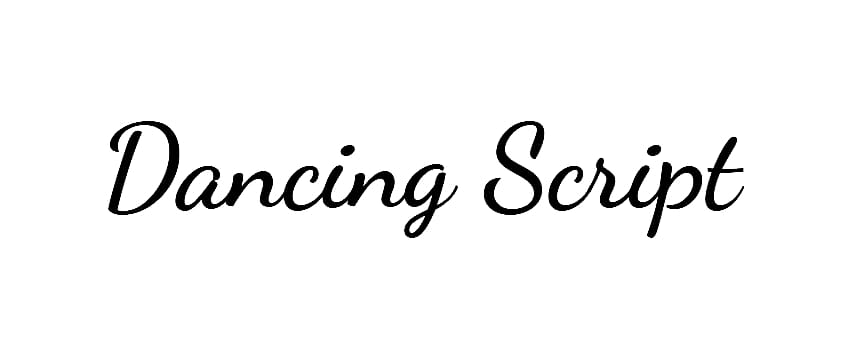
Dancing Script is one of the most famous and widely used casual cursive typefaces in modern digital design. Designed by Pablo Impallari (Impallari Type) and released in 2011, it is celebrated for its friendly, informal, and spontaneous aesthetic.
The defining trait of Dancing Script is its “dancing baseline”. The letterforms connect smoothly across words while continuously bouncing and shifting slightly in size. Additionally, its capital letters are intentionally large and drop below the main text baseline. It directly draws artistic influence from popular mid-20th-century script styles like Murray Hill (1956) and Mistral (1953).
Dancing Script Font Preview
Free ZIP · 2 font files · Free for Commercial Use
Dancing Script
All 2 styles in this font
Dancing Script Character Map
Uppercase
ABCDEFGHIJKLMNOPQRSTUVWXYZ
Lowercase
abcdefghijklmnopqrstuvwxyz
Numbers
0123456789
Punctuation
!"#$%&'()*+,-./:;<=>?@[\]^_`{|}~
Accented letters
ÀÁÂÃÄÅÆÇÈÉÊËÌÍÎÏÐÑÒÓÔÕÖØÙÚÛÜÝÞßàáâãäåæçèéêëìíîïðñòóôõöøùúûüýþÿĀāĂ㥹ĆćĈĉĊċČčĎďĐđĒēĔĕĖėĘęĚěĜĝĞğĠġĢģĤĥĦħĨĩĪīĬĭĮįİıIJijĴĵĶķĸĹĺĻļĽľĿŀŁłŃńŅņŇňʼnŊŋŌōŎŏŐőŒœŔŕŖŗŘřŚśŜŝŞşŠšŢţŤťŦŧŨũŪūŬŭŮůŰűŲųŴŵŶŷŸŹźŻżŽžƏƒƠơƯưDŽDždžLJLjljNJNjnjǦǧǪǫǺǻǼǽǾǿȀȁȂȃȄȅȆȇȈȉȊȋȌȍȎȏȐȑȒȓȔȕȖȗȘșȚțȪȫȬȭȰȱȲȳȷ
Other characters
¡¢£¤¥¦§¨©ª«¬®¯°±²³´µ¶·¸¹º»¼½¾¿×÷əʼˆˇˉ˘˙˚˛˜˝̀́̂̃̄̆̇̈̉̊̋̌
Is Dancing Script free for commercial use?
Free for Commercial Use Yes. Dancing Script is free for both personal and commercial use, such as logos, products and client work. Check the license file in the download for any conditions, such as crediting the designer. Read the license
Dancing Script is a handwritten font created by Pablo Impallari. It has a casual, written-with-a-pen look that makes designs feel personal. The free download includes two styles, and you can try every one of them with your own text in the preview above.
Dancing Script Font Details
- Designer: Pablo Impallari
- Category: Handwritten font
- Font styles: 2 (Regular and Bold)
- Glyphs: 643 in the Regular style
- Characters: A–Z, a–z, 0–9 and basic punctuation
- Languages: English, Spanish, French, German, Portuguese and Italian
- Version: 2.000
- Download: Free ZIP with two font files
What You Can Type With Dancing Script
With complete upper and lowercase letters and all ten digits, Dancing Script is ready for real wording, not just a single headline. Common punctuation such as &, !, ? and @ is included as well. It also has the accented letters you need for Spanish, French, German, Portuguese and Italian.
Where Dancing Script Works Best
Think of Dancing Script for greeting cards, journal pages and friendly social posts. Set it a bit larger than you would a normal text font. Handwriting styles lose their charm once they get too small to read comfortably. Because the family has more than one style, you can mix them in a single design for headings, subheadings and highlights.
Dancing Script Font FAQs
Is Dancing Script font free to download?
Yes. You can download Dancing Script for free from this page as a ZIP file with two font files. Free to download doesn't always mean free for business use, so check the license section on this page before you use it in anything you sell.
How do I install Dancing Script on Windows or Mac?
Extract the ZIP file, then open the font file inside it. Click Install on Windows or Install Font on a Mac. Restart any app that was already open so it picks up Dancing Script.
Can I use Dancing Script in Canva?
Yes, if you have Canva Pro, Teams or another plan that allows font uploads. Go to Brand Kit, choose Upload a font, and pick the .ttf or .otf file from the ZIP. Free Canva accounts can't upload fonts.
Does Dancing Script work in Word, Photoshop and Cricut Design Space?
Yes. Once Dancing Script is installed on your computer, it shows up in Word, Photoshop, Illustrator, Cricut Design Space and most other desktop apps, right alongside your other fonts. If you don't see it, restart the app.
Does Dancing Script support accented letters?
Yes. Dancing Script includes the accented letters needed for Spanish, French, German, Portuguese and Italian, so it works for more than just English.
What fonts pair well with Dancing Script?
A plain sans serif like Open Sans or Poppins makes a good partner for any longer text around it.